by Janani Sekar
In a large-scale monitoring setup, any change made can affect how your resources are monitored and managed. To troubleshoot issues or review account activity, it is useful to know who made a change, what was changed, and when the change occurred.
The Audit Logs feature has been enhanced to capture all user activities performed in your account. It tracks actions, such as configuration changes, logins, API calls, bulk operations, and resource deletions, along with details about who performed each action, when it occurred, where it originated, and what was changed.
What's improved in Audit Logs?
The enhanced Audit Logs feature provides the following benefits:
- Easily identify the source of configuration changes: When a monitor behaves unexpectedly, review the Audit Logs to determine whether any configuration changes were made, who made them, and when they occurred.
- Investigate unexpected account activity: If you notice unusual login attempts or unexpected changes, use the advanced filters to quickly narrow down audit records by the user, IP address, country, or source and identify the activity.
- Get notified about important account activities: Instead of manually reviewing Audit Logs, create alerts for events such as resource deletions, excessive API requests, or login activities and receive notifications as they occur.
How Audit Logs work
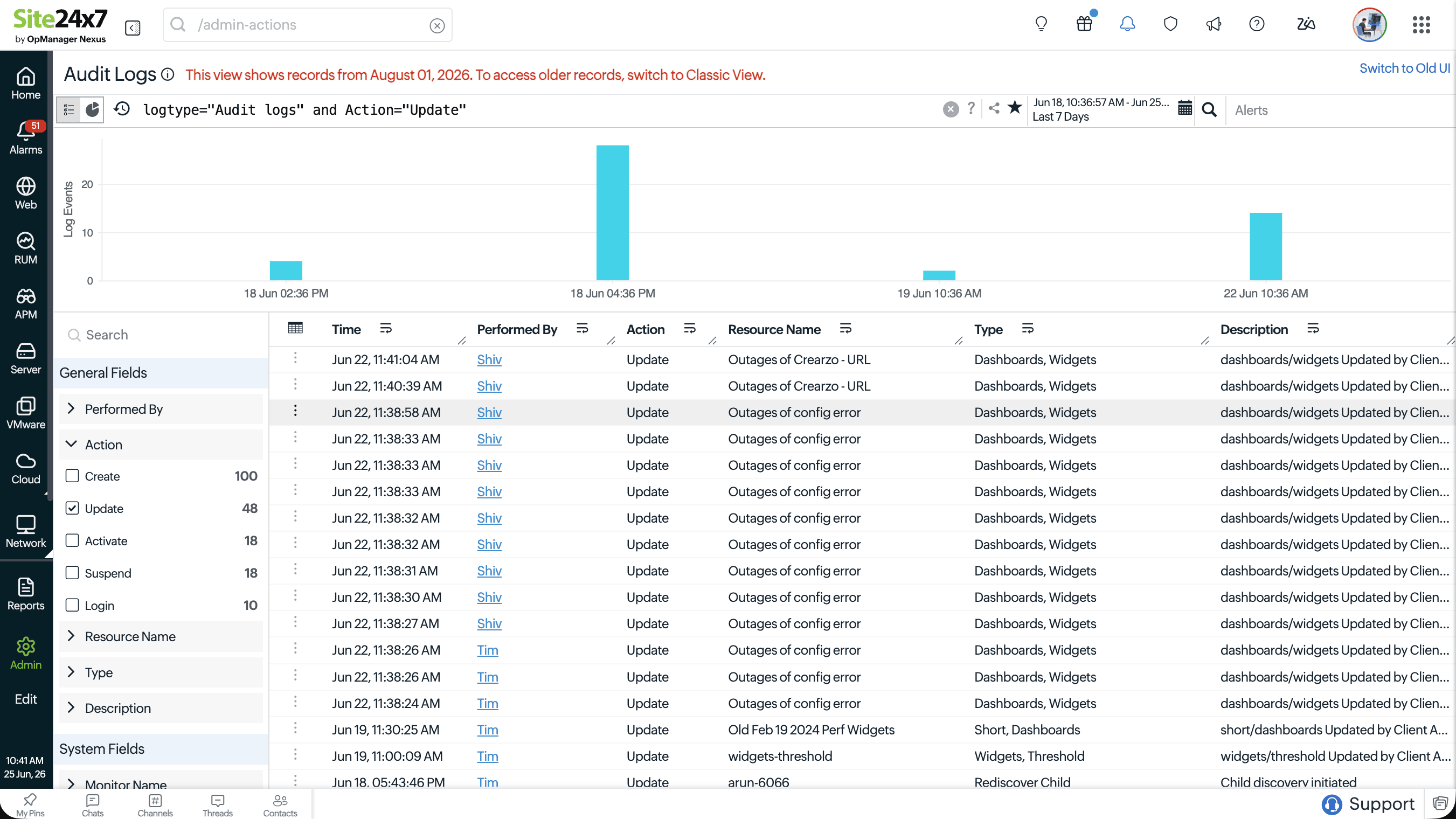
- Site24x7's Audit Logs feature is built on a query language engine, giving you a powerful, consistent way to search and filter through activity data across your account.
- When you access Audit Logs, you can apply query-based filters across fields to visualize data in a chart for trend analysis or display it in a detailed table for individual event review.
- You can drill down on any log entry to view a full detail panel showing the resource affected, the action performed, the user who performed it, the session and device context, and a side-by-side parameter comparison showing exactly what changed.
- You can also create dashboard widgets from saved audit log queries for at-a-glance visibility across your team.
Who can access Audit Logs?
The Audit Logs feature is accessible to users with the Admin, Super Admin, or MSP Admin role as well as custom role users with the appropriate permission enabled.
Get started with Audit Logs
Start using Audit Logs to review user activities, track configuration changes, and add audit log widgets to your dashboards for quick visibility.
Feel free to share your feedback in the comments. For further details, kindly contact our support team.
Best regards,
The Site24x7 team
Like (0)
Reply
Replies (0)