A status page is a dedicated communication hub that informs your users about the real-time health of your services, planned maintenance, and ongoing incidents.
Think of it as the single source of truth during downtime. By proactively communicating status, you build trust with your customers and reduce the burden on your support team. Status pages act as a bridge between your engineering team and your users, ensuring transparency when it matters most.
Create your free status page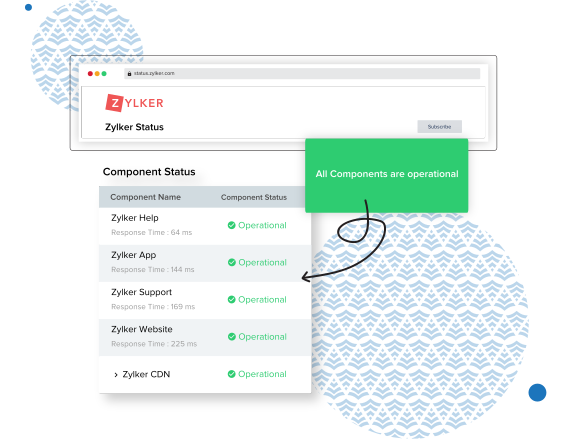

In today's always-on digital world, downtime is inevitable. The difference between a minor hiccup and a PR disaster is how you communicate. A robust status page allows you to:
It enables your IT and DevOps teams to focus on fixing the issue rather than answering "Is it down?" queries.
A modern status page automates the flow of information from detection to resolution.
Connect your monitoring tools to automatically detect outages in your website, API, or infrastructure.
Collaborate with your team to resolve the incident. Use private notes to keep internal stakeholders aligned.
Automatically update your status page and notify subscribers via email, SMS, or Slack when status changes.
To effectively communicate during downtime, your status page should include these essential elements.
Clear visual cues (green checkmarks, red crosses) showing the real-time health of each component (e.g., API, Website, Mobile App).
A log of past incidents and postmortems helps demonstrate your commitment to reliability and continuous improvement.
Displaying historical uptime percentages (e.g., 99.9%) serves as a powerful marketing tool for prospective customers.
Whether you are a startup or an enterprise, a status page is an essential tool to keep your customers in the loop whenever an outage strikes.
By providing real-time updates, status pages help organizations perform effective incident management through informing customers about incidents.
Every incident can result in a flood of emails and phone calls. The presence of a status page makes it easier for users to obtain information themselves, thereby reducing the support team's volume of work.
Being transparent about downtimes and displaying historical uptime data results in increased trust in customers.
Eliminate manual tasks. Automatically update your status page based on monitoring alerts and notify users instantly via their preferred channels.
With a feature-rich interface that is easy to use, StatusIQ offers reliable status pages that can be customized to meet your needs.
Use your own logo, favicon, and domains (CNAME) to personalize the look and feel of your status page to match your brand identity.
Add your status page as a widget to your site's header or footer, or select a floating widget that remains on the page as users scroll.
Notify users automatically via email, SMS, and RSS. Integrate seamlessly with Slack, Microsoft Teams, and other collaboration tools to keep your team in sync.
Leverage predefined templates to create incidents, update the progress of incidents, and schedule maintenance without typing from scratch.
A public status page is accessible to everyone and is typically used to communicate with external customers, building trust and reducing support tickets. A private status page is restricted to internal employees or specific stakeholders via SSO or IP whitelisting, making it ideal for internal IT incident management and system monitoring.
Modern applications are built using multiple microservices and third-party APIs. Component-level status allows you to break down your overall service health into specific parts (e.g., "Web App", "API", "Database", "Payment Gateway"). This ensures that if only one component fails, users know exactly what is affected without assuming the entire platform is down.
Incident-driven status pages (like those integrated with PagerDuty or Jira) are updated manually or automatically when your IT team logs an incident ticket. They focus heavily on communication and the response workflow. Monitoring-driven status pages (like those integrated directly with UptimeRobot or Site24x7) automatically change status based on real-time server metrics or ping responses, prioritizing instant detection over manual intervention.
Want to learn more?
Interested in our services?

